Crystal stickers · Cup wraps · Product decoration

UV DTF Printers

A UV DTF printer creates crystal stickers and cup wraps on A/B film for transfer to glass, metal, acrylic, plastic and suitable wood surfaces, with no heat press. Compare LINKO’s 12, 16.5 and 24 inch models, plus the wider UDY-604P, and find a setup for your business.

Get UV DTF Printer Price Compare Models

UV DTF Printer FAQ

UV DTF transfers can decorate glass, metal, acrylic and suitable plastic surfaces, including cups, bottles and promotional products. Compatibility depends on the surface coating, texture and shape—not just the material name.

For coated gift boxes or other delicate surfaces, sample testing is especially important to check adhesion and whether peeling affects the finish. Share your artwork, product photos and material details with LINKO to arrange an application assessment and discuss sample testing before choosing a printer.

Choose a UV DTF printer based on your largest design, daily order volume, required finish and budget. A wider printer accommodates wider designs or more items across a row; printhead configuration also affects production speed and how white ink, color and varnish are handled.

LINKO offers formats including 30 cm, 42 cm and 60 cm. Compare models using the same artwork, print mode and finish requirements. Share your typical jobs with LINKO for a suitable configuration recommendation.

Choose UV DTF when you want to print transfers on film and apply them to products afterward. This can suit businesses decorating a variety of product shapes without positioning every item on a printer bed.

Choose a UV flatbed printer when direct printing onto the object better fits your workflow. The object must meet the printer’s size, height and positioning requirements. Compare the complete process—including loading, printing and manual application—using your actual products before deciding.

A standard UV DTF setup needs a printer, laminating capability, compatible RIP software and computer, matched A/B film, UV ink, varnish, and the specified cleaning and maintenance supplies. You also need a way to cut the finished transfers. UV DTF application does not require a heat press.

LINKO can provide PrintFactory RIP with a perpetual license. Ask for an itemized quotation confirming the software, consumable quantities, accessories and training included with your chosen printer, plus any optional equipment.

LINKO can help plan starter quantities around your expected orders and replenishment schedule. Confirm the minimum order quantity for each film, ink and maintenance product in your quotation, including requirements for future reorders.

Plan stock using estimated printed area, ink coverage, delivery time and the product’s labeled shelf life. For a new application, test the matched ink-and-film combination before buying larger quantities. Avoid overstocking materials that you may not use within their recommended storage period.

A UV DTF printer needs regular nozzle checks, cleaning of specified maintenance components, and the shutdown procedure recommended for its model. Maintenance remains necessary even when orders are intermittent.

Before a weekend or holiday, follow the appropriate idle-period procedure rather than simply switching off the power. Use only the specified maintenance fluids and complete the recommended checks before restarting. LINKO provides model-specific instructions, including daily and holiday maintenance guidance for the Y-603.

LINKO provides operating guides, instructional videos and remote technical assistance for printer installation, software configuration and operation. Before delivery, confirm the workspace, power supply and computer requirements for your selected model so preparation can begin early.

Discuss your training needs when ordering, including first-print setup, routine maintenance and troubleshooting. If you need on-site installation or training, confirm availability, scope and charges for your location in advance. Visit LINKO Technical Support for preparation and model-specific resources.

Compare LINKO UV DTF Printer Models

Start with print width, head configuration and laminating. Open a model page for its full specifications.

Model / product detailsPrint widthEpson printheadsLaminatingConsider for
UDY-503
16.5 inch A2 UV DTF printer
420 mm / 16.5 in · A23 × Epson i1600-U1IntegratedA middle-width option for repeat label and cup-wrap orders.
UDY-402
A3 UV DTF printer
300 mm / 12 in · A32 × Epson XP600 or 2 × i1600-U1Integrated, electricSmaller layouts and short production runs.
UDY-603
24 inch UV DTF printer
600 mm / 24 in · A13 × Epson i3200-U1Integrated, electricWider layouts and multiple designs across a roll.
UDY-604P
A1 UV DTF printer with laminator
Up to 650 mm / 25.6 in · A14 × Epson i3200-U1 or 4 × i1600Integrated, dual rollerA wider option with a dual-varnish configuration.

UDY-503

16.5 inch A2 UV DTF printer

Print width: 420 mm / 16.5 in · A2
Printheads: 3 × Epson i1600-U1
Laminating: Integrated

A middle-width option for repeat label and cup-wrap orders.

UDY-402

A3 UV DTF printer

Print width: 300 mm / 12 in · A3
Printheads: 2 × Epson XP600 or 2 × i1600-U1
Laminating: Integrated, electric

Smaller layouts and short production runs.

UDY-603

24 inch UV DTF printer

Print width: 600 mm / 24 in · A1
Printheads: 3 × Epson i3200-U1
Laminating: Integrated, electric

Wider layouts and multiple designs across a roll.

UDY-604P

A1 UV DTF printer with laminator

Print width: Up to 650 mm / 25.6 in · A1
Printheads: 4 × Epson i3200-U1 or 4 × i1600
Laminating: Integrated, dual roller

A wider option with a dual-varnish configuration.

Standard ink layers are white, CMYK and varnish; UDY-604P lists two varnish channels. Actual output depends on print mode, artwork and configuration. Ask for a sample run using your files.

Looking for another process? Explore the DA-604 UV sticker printer or compare UV DTF printing solutions.

Which UV DTF Machine Fits Your Business?

Choose around your artwork width, order mix and available workspace. Compare a complete workflow as well as the printer.

Short runs & smaller layouts

Consider the UDY-402 when A3 / 300 mm fits your work. Discuss printhead choice and maintenance needs before choosing a small UV DTF printer.

Repeat custom orders

Consider the UDY-503 for 420 mm layouts. Check how your regular labels and cup wraps nest across the film.

Wider production layouts

Consider the UDY-603 or UDY-604P when wider film suits your order mix. Confirm print, laminate and cutting capacity together.

Planning a new business? Read our UV DTF printer selection guide for a broader buying checklist.

UV DTF Printer Price: What Affects the Cost

The UV DTF printer price depends on the selected configuration and delivery requirements. Request an itemized quotation for a useful comparison.

Machine configuration

  • Print width and model
  • Epson printhead type and quantity
  • Laminating and varnish configuration
  • RIP software and selected accessories

Your complete startup cost

  • Matched film, ink and cleaning supplies
  • Cutting equipment where required
  • Delivery destination and shipping method
  • Workspace, power and routine maintenance

To buy a UV DTF printer, tell us your country, products to decorate, widest design, monthly demand and target purchase date. We can then discuss a machine, consumables and delivery plan together.

Request an Itemized Quote

What You Can Make with UV DTF Printing

Decorate finished items with transferred artwork, including cup wraps, product labels and personalized gifts. Surface suitability depends on the material and finish.

uv dtf printer for cup wraps-mug

Cups & tumblers

Cup-wrap designs and personalized drinkware.

UV DTF printer application-glass bottle

Bottles & packaging

Logos and decorative labels on suitable glass surfaces.

UV-DTF-printer-application-plastic-bottles

Gifts & products

Branding and decoration on suitable plastics and finished items.

Glass, metal, acrylic, plastic and suitable wood surfaces are common applications. Test adhesion on the actual item before production. For T-shirts and fabrics, see DTF printers.

Discuss Your Application

How a UV DTF Printer Works

  1. Prepare the artwork: set up the file and selected print mode in RIP software.
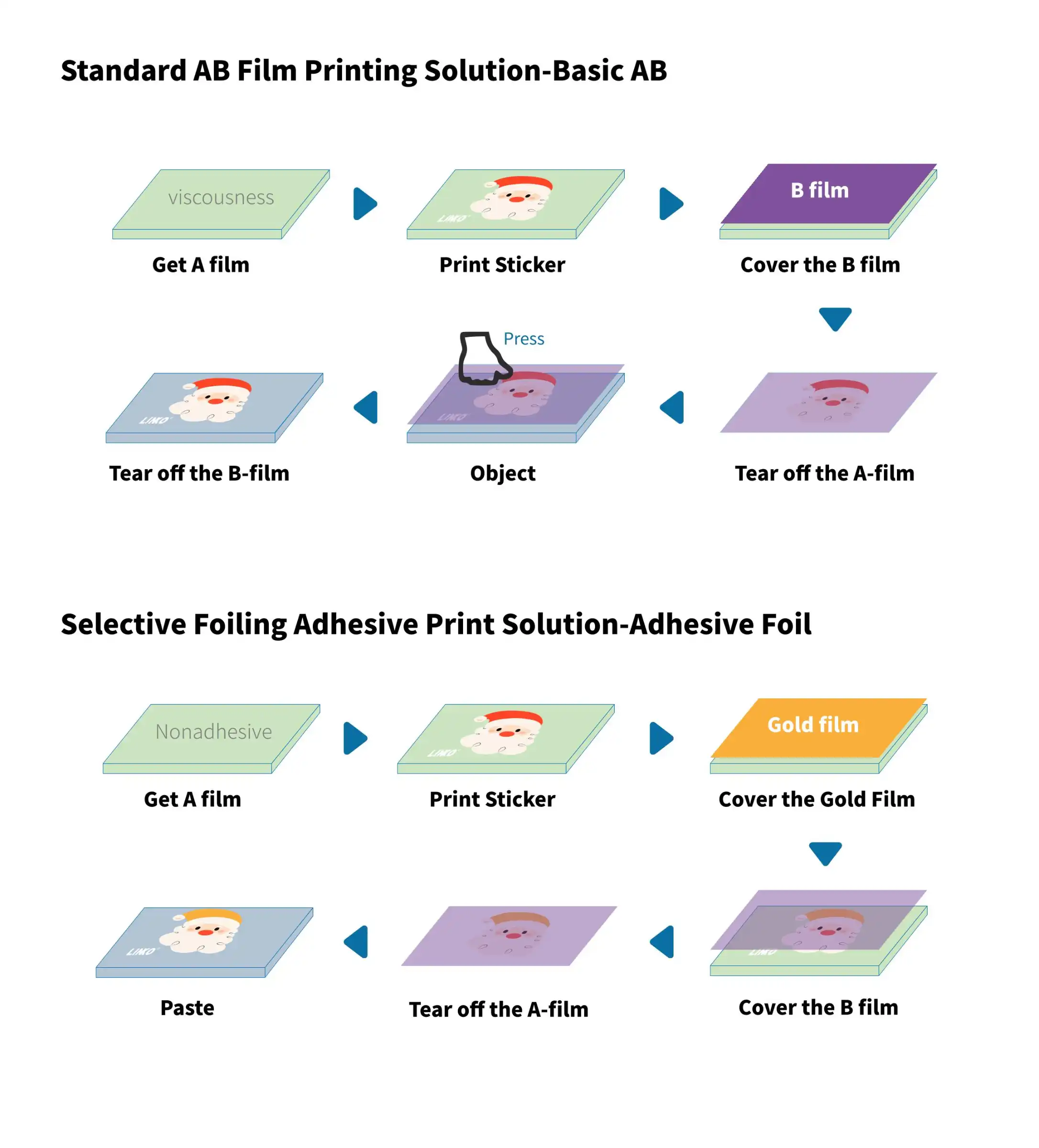
  2. Print and cure: print the required layers on A film and cure the ink with UV light. The layer order and adhesive system depend on the solution.
  3. Laminate: combine the print with the matching B film.
  4. Apply the transfer: cut the design, remove the backing, press it onto the prepared item, then peel away the transfer carrier according to the film instructions.

Read what UV DTF printing is for the full explanation.

Introduction to UV DTF process

Complete UV DTF Printing Setup

Match the printer, consumables and finishing workflow before you place an order.

Printer & RIP

Choose the print width and head configuration, then confirm the supplied RIP software and computer requirements.

Film & ink

Use matched UV DTF A/B film and UV DTF ink. Confirm whether the selected solution uses pre-coated film or printed adhesive.

Laminating & cutting

The four UDY models listed here include integrated laminating. Plan cutting around your order volume; ask about the KFK-7090D roll-fed cutter.

Explore UV DTF printing solutions to compare film and finish options.

Plan Your Consumables and See the Workflow

Match film width to the selected printer and confirm ink, varnish, adhesive and cleaning supplies as one system. Starter quantities depend on your artwork coverage and expected orders.

Ask for an itemized consumables list with your machine quotation.

Get a Complete Setup Quote

Why Buy a UV DTF Printer from LINKO

Work with a UV DTF printer manufacturer in China on machine selection, matched consumables and operator guidance.

Configuration advice

Discuss your products, artwork and working conditions with LINKO to select a suitable printing setup.

Installation & operator guidance

Get manuals, operation and maintenance videos, and remote guidance from LINKO’s technical team.

Consumables & spare parts

Request a matched consumables list and model-specific spare parts information with your quotation.

Order & delivery planning

Confirm the final machine configuration, packing details, delivery destination and shipping terms before purchase.

Get a UV DTF Printer Quote

Tell us what you want to make and where the machine will be used. Include your business type, widest design, expected monthly demand and target purchase date so we can recommend a suitable configuration.

Request a machine quotation, matched consumables list and delivery options for your destination.

    Please prove you are human by selecting the house.