A3 DTF Printer Buying Guide
An A3 DTF printer is worth considering when you want to produce common apparel graphics in a compact workspace and your order volume supports regular printing. Before buying, check that your largest design fits the usable print width, the complete workflow can handle your workload, and you can budget for routine maintenance.
For occasional orders, buying ready-made transfers may still be more practical. For recurring wholesale gang sheets or workloads beyond a compact system, compare a wider production system. The right choice depends on your orders and operating costs, not the printer's size label alone.
A3 size vs. actual print width
Standard A3 paper measures 297 × 420 mm (11.7 × 16.5 in). DTF equipment sold as A3 or A3+ usually prints on rolls, and its maximum image width varies by model. The category name does not guarantee a particular usable width.
Always distinguish the supported film width from the maximum image width: a roll can be wider than the area the machine can print. Roll-fed machines print along a continuous roll, which reduces manual loading for repeat jobs and gang sheets (several designs combined in one layout). Maximum job length still depends on the machine and software.
Deciding between A3 and A4? See A3 vs. A4 DTF Printer: What's the Difference?
A3 or 24-inch: match the system to your orders
Occasional orders
Compare buying ready-made transfers with owning a printer. Low order frequency can make maintenance time and fixed costs difficult to justify.
Regular small batches
Evaluate an A3 system when your designs fit its usable width and a timed sample run can meet your schedule. It can suit clothing startups, online sellers and local print shops.
Growing or wholesale orders
Compare a 24-inch DTF system when recurring gang sheets, wider designs or daily backlogs exceed a compact setup’s capacity.
L402 planning reference: LINKO positions the L402 for approximately 150–200 garments in a 6–8 hour day using an A4-size design template. This is a planning reference, not guaranteed finished-garment output. Design coverage, layout, print mode, rejects and finishing capacity affect the result.
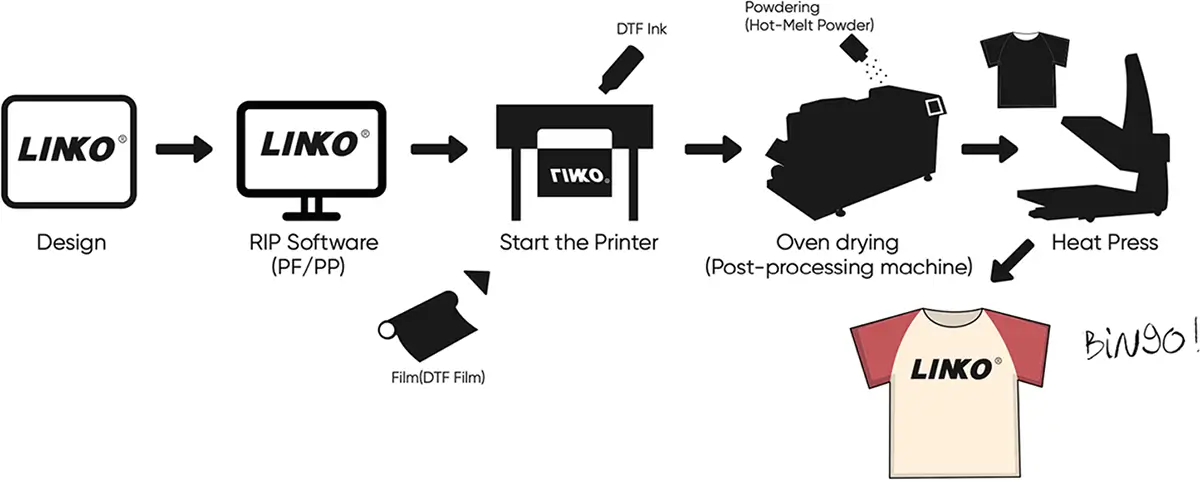
Ask for a timed run of your own artwork, including white ink. Check printing, powdering, curing and heat-press time separately, and leave capacity for maintenance and order peaks. Consider expected demand over the next 6–12 months.
Features to compare before buying
Printheads and speed
Confirm the exact printhead model and number of heads (for example, Epson XP600 or i1600). Ask about replacement head cost and warranty.
Compare speed at matching quality targets, recording pass count, resolution and white ink settings. The same pass count alone does not make two printers comparable. Ask whether the speed includes color plus white, and time the same sample job.
White ink management
White pigment settles when ink stands unused. Circulation and agitation help, but do not make a printer maintenance-free.
Ask which parts of the ink path circulate, how the system behaves when idle, what power state it requires, and for written instructions for a 3-day and 1–2 week break.
Film handling and finishing
Check film tracking, stable feeding and compatibility with the powder shaker and curing unit.
Ask for a demo of the full setup: a fast printer will not deliver fast orders if powdering or curing holds up production.
Software and color
Confirm the RIP software, compatible computer and operating system, and whether the license is permanent or subscription-based, and how it transfers to a replacement computer.
Ask for ICC profiles for your ink, film and print mode, and judge color on pressed samples on your target fabrics.
Workspace
Measure the complete installation: printer, film path, shaker or oven, extraction, heat press and maintenance access.
Check electrical, temperature, humidity and ventilation requirements, and plan handling with the ink and powder safety data sheets.
Technical support
Confirm installation help, training, support hours and time zone, spare-parts availability and the fault diagnosis process.
Request written warranty terms covering components, exclusions, shipping and printheads.
Budgeting for an A3 DTF setup
A useful price comparison starts with an itemized quote. A printer-only offer and a bundle with finishing equipment, software and supplies are different investments. Record the quote date, currency, configuration and delivery terms before comparing suppliers.
| Budget item | What to confirm |
|---|---|
| Printer | Exact model, heads, accessories, installation |
| Powdering and curing | Shaker or manual tools, oven or curing unit, capacity |
| Workspace equipment | Extraction or filtration, heat press, electrical work |
| Software and computer | RIP license, renewals, compatible computer |
| Starter supplies | Ink, film, powder, cleaning supplies, quantities |
| Delivery | Freight, insurance, duties and taxes |
| Training and service | Included training, service charges, initial spare parts |
Cost per usable transfer
For a representative batch, record film, ink, powder, cleaning materials, electricity and operator time. Include setup and rejected transfers in the cost, but divide by the usable transfers delivered.
Allocate ongoing costs such as equipment payments, software fees, maintenance and extra workspace across expected monthly usable output. Avoid counting costs twice. A finished-shirt cost also includes the blank garment, heat-press labor and energy if not already counted, packaging and order-specific charges.
Owning vs. outsourcing transfers
Each month, compare the delivered price of outsourced transfers with your in-house variable cost for the same quantity plus added fixed costs. A simple break-even quantity is added monthly fixed costs ÷ (outsourced delivered cost per transfer − in-house variable cost per transfer). It only holds if your in-house cost is lower and the printer can produce that quantity in your available hours. Treat it as a planning estimate, not a profit guarantee.
Featured model / Official specifications
Evaluating the LINKO L402 A3 DTF printer
The LINKO L402 is a compact roll-fed option to compare against your sample job and budget.
| Specification | LINKO L402 |
|---|---|
| Printheads | 2 × Epson i1600-A1 |
| Color configuration | 1 × CMYK + 1 × White |
| Print speed | 8 pass (720 × 1200 dpi): 2.82 m²/h 10 pass (720 × 1500 dpi): 2.21 m²/h 12 pass (720 × 1800 dpi): 1.85 m²/h |
| Ink | Water-based DTF ink, 1,500 mL tank per color |
| Media | DTF transfer film |
| Heating | Front and rear heaters, 0–100 °C |
| RIP software | PrintFactory (Windows 10 / 11, 64-bit) |
| Interface | Gigabit Ethernet (via USB 3.0 adapter) |
| Power | 110 V or 220 V version, single phase, ≤ 700 W |
| Operating environment | 22–28 °C (72–82 °F), 45–60% RH |
| Machine size / net weight | 82 × 63.7 × 85 cm / 57 kg (125 lb) |

Other L402 features: THK high-rigidity guide rails, a LeadShine servo motor for carriage movement with a stepper motor for film feeding, a modular structure for easier cleaning and part replacement, and a holiday mode that keeps the printer powered and automatically circulates and stirs the white ink while it is idle. Listed speeds are manufacturer specifications. Confirm the usable image width and supported film width for your supplied configuration, software license, finishing equipment and supplies included in your quote, and ask LINKO technical support for current installation and maintenance instructions.
Need more output? Compare the LINKO K-60 24-inch DTF printer, or browse all LINKO DTF printers.
A3 DTF printer buyer's checklist
- Maximum usable width fits your widest design, including margins.
- Timed sample job with your intended color and white settings.
- Transferred samples checked on your intended garments.
- Powdering, curing and heat-press capacity match the workload.
- Full installation footprint and utility requirements confirmed.
- Routine and long-idle maintenance instructions received.
- RIP license, computer compatibility, training and color support verified.
- Written warranty terms, spare-parts prices and support hours.
- Itemized delivered quotes and cost per usable transfer compared.
- Owning a printer makes sense at your expected order frequency.
A3 DTF printer FAQs
How many garments per day can an A3 DTF printer handle?
Based on LINKO's production positioning, the L402 is positioned for approximately 150–200 garments in a 6–8 hour day using an A4-size design template. This model-specific planning reference is not a guarantee for every A3 printer. Actual output depends on design size, print mode, finishing equipment and operator workflow.
What is the print width of an A3 DTF printer?
It varies by model. Standard A3 paper measures 297 × 420 mm, while machines marketed as A3 or A3+ can have different usable widths. Confirm both supported film width and maximum image width for the exact configuration, then check your widest design with margins.
What materials can a DTF printer print on?
Typical applications include T-shirts, hoodies, sportswear, workwear, uniforms, canvas bags and fabric caps. 100% cotton and cotton-rich fabrics (knits, canvas, denim) are recommended. Polyester, cotton-poly blends, nylon, high-stretch, coated or waterproof fabrics and PU leather need sample testing first, and some may need special film, powder or low-temperature transfer settings.
Does DTF printing require special ink?
Yes. DTF printers use dedicated pigment inks made for PET transfer film and hot-melt powder. A typical setup is CMYK plus white, which creates the underbase for printing on dark and colored fabrics.
What consumables do I need for DTF printing?
Compatible DTF ink, PET DTF film, hot-melt powder, cleaning fluid and any manufacturer-specified maintenance fluid. Consumable quality and compatibility affect color, transfer performance, printhead stability and production cost.
How do I maintain a DTF printer?
Clean and inspect regularly, especially the printhead, white ink system, capping station and other ink-contact parts. Procedures depend on how often the printer is used and how long it stays idle, so follow the manufacturer's schedule and shutdown instructions.
What after-sales support does LINKO provide?
LINKO provides remote installation assistance, one-on-one training, operating and maintenance documentation, troubleshooting support and warranty coverage for eligible core components. Confirm included services, support hours, exclusions and printhead coverage in your written quotation and warranty terms. See LINKO technical support.
Need help choosing the right A3 DTF printer?
Tell us your application, expected daily volume, available workspace and budget. LINKO will help you decide whether an A3 DTF printer or a larger production system fits your business.
A3 DTF Printer Features
- High-resolution printing, up to 2880 dpi.
- Supports a variety of fabrics, including cotton, polyester, nylon, etc.
- Economical consumables, low printing cost.
- Easy operation, user-friendly interface design.
- Strong durability, suitable for mass production.