


24 in / 60 cm
Nominal format
2–5 heads
Four model configurations
Up to 30 m²/h
K-6054 · 6 pass
最小注文数量 1
One machine
Choose your configuration
Choose Your 24 Inch DTF Printer
Compare 6-pass output across the series. The 3-head K-6038 is the dedicated 8-color + White option.
K-602 · 2 heads
9平方メートル/時
| プリントヘッドの設定 | 2 heads |
| Color configuration | CMYK + 白 |
| Print mode | 6 pass |
16 m²/h at 4 pass.
K-6038 · 3 heads
8 m²/h
| プリントヘッドの設定 | 3 heads |
| Color configuration | CMYK + ROGB + White (8-color + White) |
| Print mode | 6 pass |
K-6044 · 4 heads
15㎡/時
| プリントヘッドの設定 | 4頭 |
| Color configuration | CMYK + 白 |
| Print mode | 6 pass |
21 m²/h at 4 pass
K-6054 · 5 heads
30㎡/時
| プリントヘッドの設定 | 5頭 |
| Color configuration | CMYK + 白 |
| Print mode | 6 pass |
Supplied with an air-shaft stand.
Reading the speed figures
Epson i3200 DTF Printer Speed by Head Count
4 Pass
720 × 1200 dpi
| モデル | Throughput |
|---|---|
| K-602 | 16 m²/時 172平方フィート/時 |
| K-6038 | — |
| K-6044 | 21 m²/h 226平方フィート/時 |
| K-6054 | — |
6パス
720 × 1800 dpi
| モデル | Throughput |
|---|---|
| K-602 | 9平方メートル/時 97 ft²/h |
| K-6038 | 8 m²/h 86 ft²/h |
| K-6044 | 15㎡/時 161 ft²/h |
| K-6054 | 30㎡/時 323 ft²/h |
8パス
720 × 2400 dpi; K-6038: 720 × 1800 dpi
| モデル | Throughput |
|---|---|
| K-602 | 6 m²/h 65 ft²/h |
| K-6038 | 5 m²/h 54 ft²/h 720 × 1800 dpi |
| K-6044 | 11 m²/h 118 ft²/h |
| K-6054 | 15㎡/時 161 ft²/h |
技術仕様
K-60 DTF Printer Specifications & Installation Requirements
印刷およびインクシステム
| Product series | 60 cm Series |
| Printhead model | Epson i3200-A1 |
| 最大印刷幅 | ≤67 cm / ≤26.38 in |
| 最大画像幅 | ≤65 cm / ≤25.59 in |
| 推奨される確保金 | 2 cm / 0.79 in |
| Ink & media | Water-based DTF ink DTF転写フィルム |
| Ink tank / waste tank | 1,800 mL per color / 3,000 mL |
| フロント/リアヒーターの範囲 | 0–65°C |
| RIPソフトウェア | PrintFactory · permanent license included No monthly subscription fee |
Installation & working conditions
| 機械寸法 (L × W × H) |
196.6 × 77 × 173 cm 77.40 × 30.31 × 68.11 in |
| 動作温度 | 22–28°C / 72–82°F |
| 動作湿度 | 45–60% RH |
| 電源オプション | AC 110 V ±10% or AC 220 V ±10% 50/60 Hz · single phase |
| オペレーティングシステム | Windows 10 / 11 (64-bit) |
| データインターフェース | ギガビット・イーサネット (via USB 3.0 adapter) |
| 保証期間 | 12ヶ月 |
| 認証 | CE規格準拠(EMC、LVD、RoHS) |
Heater ranges describe printer heaters, not powder-curing or heat-press settings. Choose the 110 V or 220 V version when ordering. Maximum power: ≤1,200 W (K-602, K-6038, K-6044), ≤2,200 W (K-6054).
Software & Electrical Requirements
Circuit capacities below are recommended values.
| 仕様 | 詳細 |
|---|---|
| Software listed — all four models | プリントファクトリー |
| License — all four models | Permanent license included; no monthly subscription fee |
| Circuit — K-602 / K-6038 / K-6044 | 110V Version: ≥16 A | 220V Version: ≥10 A |
| Circuit — K-6054 | 110V Version: ≥25 A | 220V Version: ≥16 A |
Packing & Weights
| 仕様 | 詳細 |
|---|---|
| Net weight — all four models | 220 kg | 485 lb |
| Gross weight — all four models | 298 kg | 657 lb |
| Package dimensions — all four models | 207 cm× 114cm × 84 cm | 81.50 in× 44.88in × 33.07 in |
What will you print?
What the K-60 24 Inch DTF Printer Prints
As a 24 inch DTF printer for T-shirts, hoodies, sportswear, workwear and canvas bags, the K-60 prints artwork onto DTF film. The film is then powdered, cured and heat-pressed onto the garment.

T-shirts & custom apparel
Plan short runs, branded garments and repeat designs for your garment decoration business.

Transfer printing
Arrange artwork on film for transfer orders. Use your own files to compare detail and color before selecting a model.

Canvas bags & merchandise
Explore cotton canvas bags and fabric merchandise alongside your apparel work.
Fabric compatibility: Recommended materials include cotton, cotton-rich fabrics, cotton knits, cotton canvas and cotton denim. Polyester, blends, nylon and high-stretch fabrics require testing.

01 / ACCESS
Multi-Angle Maintenance Access
Multi-angle access doors, expanded service space and numbered wiring help operators reach the areas that need attention.

02 / OPERATION
Electric Lift Bar, Rear Controls and LED Lighting
An electric lift bar, rear controls, LED lighting and a computer stand support loading, observation and everyday operation.

03 / ENVIRONMENT
Carriage and Platform Heating (3 Zones)
Operate at 22~28℃、45~60%RH. Carriage-base heating and three independently controlled platform heating zones support the printing process.

04 / FILM HANDLING
Dual-Drive Film Feeding and Tension Control
Dual-drive film feeding and precision tension control support film transport.
See the equipment in motion
Watch the LINKO K-60 DTF Printer Demo

LINKO K605 video demonstration: film feeding, printing and the finishing line.
- Look at film handling and machine operation
- Review the printer and finishing setup
- Request a test for your exact K-60 configuration

Example K-60 setup with powder shaker and dryer.
Plan the complete workflow
Complete DTF Printing Setup: Powder Shaker, Dryer and Consumables
The K-60 printer and RIP are quoted with or without a powder shaker and dryer. DTF ink, film and hot-melt powder are listed in the quotation.
- Printer & RIP configuration: Specify the K-60 model, ink configuration, software and license terms.
- Powder shaker, dryer & heat press: Match finishing capacity to the chosen print mode and production target.
- Ink, film & hot-melt powder: Choose compatible consumables and agree on starter quantities.
- Computer, power & working area: Plan the required PC, circuits, ventilation and access for operation and servicing.
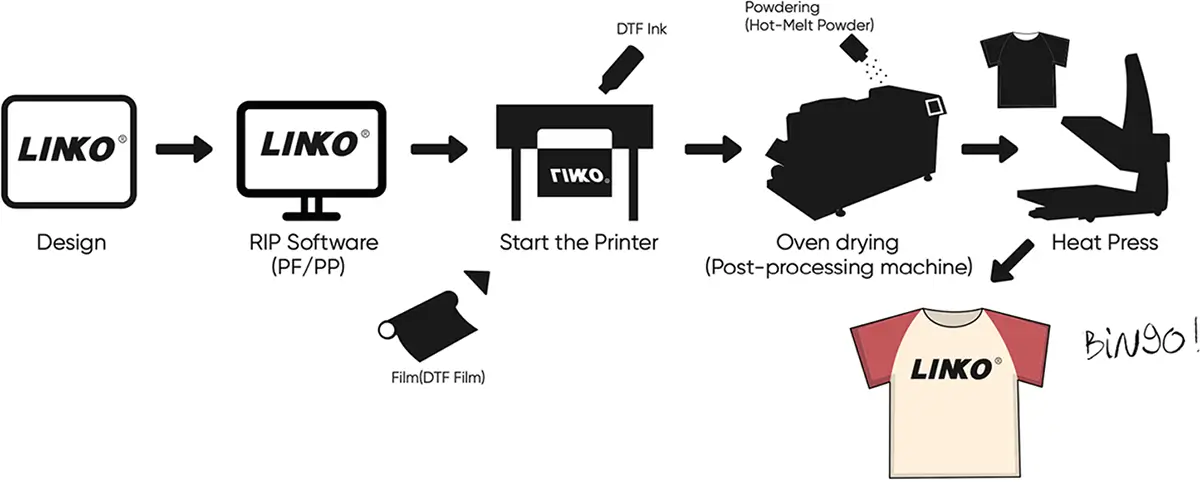
01 Print the film
Prepare artwork in RIP software and print the transfer onto DTF film.
02 Powder & cure
Apply hot-melt powder and cure using settings matched to the consumables.
03 Heat press
Transfer to the garment with verified temperature, time and pressure.
04 Inspect the result
Check adhesion, appearance and durability on the actual fabric.

DTFインキ
Match the selected color setup

DTF転写フィルム
フィルム幅と、ホットピールまたはコールドピールのタイプを選択してください。

ホットメルトパウダー
Test with your fabric before production
Make your decision with evidence
Request K-60 Print Samples and a Printing Demo
A useful demonstration reflects the work you plan to sell. Request the model, print mode and materials to be identified in your sample test.
- Artwork sample: fine text, gradients, solid colors and the fabric you actually use.
- Machine demonstration: nozzle check, print mode, ink setup and workflow.
- Order documentation: specification sheet, packing details and CE declaration of conformity.
Transfer example. Request a sample produced on your selected configuration.

Packaging example. Final packing depends on the ordered equipment.
Installation & ongoing care
K-60 Installation, Maintenance & Warranty
Include setup guidance, routine care and service terms in your purchase discussion.
01 / セットアップ
インストールとトレーニング
LINKOは、設置ビデオ、リモート設定ガイダンス、およびマンツーマンの機械操作トレーニングを提供しています。.
- Machine placement and electrical preparation
- Software setup and color workflow
- Operator checks before production
02 / メンテナンス
Routine maintenance
Follow the model-specific instructions for nozzle checks, cleaning, ink care and waste-ink management.
- Monitor temperature and humidity
- Maintain the white-ink system
- Keep the printer powered on idle days so white-ink circulation and holiday mode run
03 / 事前に計画を立てる
12ヶ月保証
12ヶ月限定保証 メインボード、ヘッドボード、キーモーターなどの主要部品が対象となります。プリントヘッドおよび消耗品は対象外です。.
- 純正スペアパーツはご注文いただけます
- 保証期間終了後もリモートサポートは継続されます。
- 規約全文: 保証ポリシー
MOQ, lead time & shipping
Minimum order: 1 machine. Share quantity, destination and target arrival date. The quotation states production lead time and shipping terms.
Customization & dealer supply
Tell us about your branding, configuration or dealer needs. We reply with the available options and dealer terms.
よくある質問
LINKO K-60 DTF Printer FAQ
Configuration, materials, maintenance and the details that make a quotation useful.
Choose your K60 configuration according to daily order volume, print quality requirements, budget and operator experience.
- 2 heads: Consider this configuration when its output meets your workload and you want to limit the initial investment.
- 3 heads: Consider the K-6038 when you need CMYK + ROGB + White (8-color + White). At 6 Pass, its reference output is 13 m/hour or 8 m²/hour.
- 4 heads: Consider this option when you need more capacity than the 2-head version.
- 5 heads: Consider this configuration for higher-volume production, with sufficient drying and finishing capacity to match.
Share your typical artwork, daily transfer requirements and working hours with LINKO to compare configurations under the same printing conditions.
At 6 Pass and 720 × 1800 dpi, the K60 specification lists the following reference printing speeds:
| 構成 | Linear output | Area output |
|---|---|---|
| 2 Epson i3200 printheads | 15 m/hour | 9 m²/hour |
| 3 Epson i3200 printheads | 13 m/hour | 8 m²/hour |
| 4 Epson i3200 printheads | 25 m/hour | 15 m²/hour |
| 5 Epson i3200 printheads | 50 m/hour | 30 m²/hour |
These figures describe printing throughput, not finished garments per hour. Actual daily output depends on print settings, artwork layout, job changes, maintenance and downstream processing. For production planning, use a representative job and allow time for powder application, drying, cutting and heat pressing.
Choose a DTF powder shaker and dryer that matches the K60’s film width and the output of your selected printhead configuration. Drying capacity should support your intended printing speed.
Powder handling and ventilation features depend on the selected equipment. Automatic powder application does not necessarily include automatic powder recovery. Built-in filtration, a separate fume extractor and an external exhaust connection are also different options.
Ask for an itemized quotation identifying the shaker model, powder-recovery function and ventilation arrangement included in your package.
Yes. The K60 can be quoted as a printer-only purchase, with a powder shaker and dryer offered separately. However, compatibility with your existing equipment needs to be checked before ordering.
Provide the equipment model, working width, inlet height, drying capacity and photos or videos of the film path. These details help assess physical alignment and whether the existing dryer can handle the planned output. Matching nominal width alone does not confirm that two machines will work together without adjustment.
The K60 includes PrintFactory RIP with a perpetual license and no monthly subscription fee. A computer is an optional purchase, rather than an automatic part of every package.
If you want a preconfigured computer, confirm its specifications and the software setup included in your quotation. If you use your own computer, check the current system and network requirements with LINKO before delivery. Factory preparation does not replace the installation checks and print verification required after the equipment arrives.
Existing consumables should be assessed individually before use. A product labeled “DTF ink,” “DTF film” or “DTF powder” is not automatically a confirmed match for every printer configuration.
Color consistency depends on the ink, print settings, ICC profile and transfer process working together. Do not assume an ICC profile from your previous printer will produce the same result on the K60.
Share the consumable specifications with LINKO and test representative artwork before production. Confirm compatibility and applicable support and warranty terms before changing the recommended consumable system.
No. White ink circulation and automatic moisturizing support printer care, but they do not replace nozzle checks, cleaning or the correct shutdown procedure.
Automatic moisturizing is an optional K60 feature, so confirm whether it is included in your configuration. Routine maintenance should follow the instructions for your specific machine, including checks of the nozzle pattern, capping station, wiper and waste-ink system.
Before a weekend or longer shutdown, follow the appropriate idle-period procedure and confirm any power requirements with LINKO. Complete the recommended checks before restarting production.